Why You Should Avoid Cheap Local Parts in Mobile Repair

Why You Should Avoid Cheap Local Parts in Mobile Repair
Mobile repairing industry me ek bohot common masla hai – cheap local parts ka use. Bohot se customers paisa bachane ke liye duplicate ya low-quality parts install karwa lete hain, lekin asal me ye decision unke mobile aur pocket dono ke liye risky sabit hota hai. Is article me hum jaanenge ke cheap local parts ka nuksan kya hai, kyun avoid karna chahiye aur genuine parts ka faida kya hai.

❌ Cheap Local Parts Kya Hote Hain?

Local ya duplicate parts wo hote hain jo original manufacturer ke standards par nahi bane hote. Ye parts bazar me saste rate par mil jate hain, lekin inki quality, durability aur performance original parts jaisi nahi hoti.

🚨 Problems with Cheap Local Parts

1. Low Durability ⏳

Ye parts zyada din chal nahi pate.

Thodi si heat, pressure ya moisture se kharab ho jate hain.

2. Poor Performance ⚑

Display ki brightness kam hoti hai.

Touch lag karta hai ya delay deta hai.

Battery zyada jaldi drain hoti hai.

3. Heating Issues πŸ”₯

Duplicate batteries aur charging ICs zyada heat produce karte hain.

Kabhi kabhi blast ka risk bhi hota hai.

4. Risk to Other Components πŸ› οΈ

Low quality parts poore motherboard ko damage kar sakte hain.

Example: sasti charging IC ya cable se Power IC short ho jata hai.

5. Customer Dissatisfaction 😑

Customer ko lagta hai phone repair ho gaya, lekin jaldi hi problem wapas aa jati hai.

Is wajah se technician ki reputation bhi kharab hoti hai.

βœ… Benefits of Using Original / High-Quality Parts

1. Long Lifespan πŸ•’

Genuine parts zyada durable hote hain aur years tak chal jate hain.

2. Better Performance πŸš€

Display, touch, battery aur other components smooth aur efficient work karte hain.

3. Safe for Mobile πŸ”’

Original parts mobile ke motherboard aur ICs ke liye safe hote hain.

4. Customer Trust 🀝

Genuine parts use karne se customer ko confidence milta hai aur woh dobara aapki shop par aata hai.

5. Value for Money πŸ’°

Thoda mehnga hota hai, lekin long term me paisa bachta hai kyunki baar baar replace nahi karna padta.

πŸ’‘ Pro Tips for Technicians

Customer ko cheap vs original part ka clear difference samjhayen.

Agar customer insist kare, to unhe duplicate part ke risk likhit me bata dein.

Hamesha trusted suppliers se parts khariden.

Customer ki trust ke liye warranty card provide karein.

βœ… Conclusion

Mobile repairing me short-term saving ke liye cheap local parts ka istemal ek galti hai. Technician aur customer dono ke liye behtar hai ke original ya high-quality compatible parts use kiye jayein. Remember: β€œQuality parts save time, money, and reputation.”

πŸ“Œ Meta Description (SEO)

“Cheap local parts can damage your phone and reduce performance. Discover why using original parts in mobile repair is always the best choice.
Software Flashing Kya Hai? Tools Aur Tarika – Mobile Repairing Expert Guide

Meta Description:
Software Flashing Kya Hai? Tools Aur Tarika – Is article mein jaaniye software flashing ka matlab, us ke liye required tools, aur poora flashing process step by step. Ideal guide for mobile repairing students and professionals.


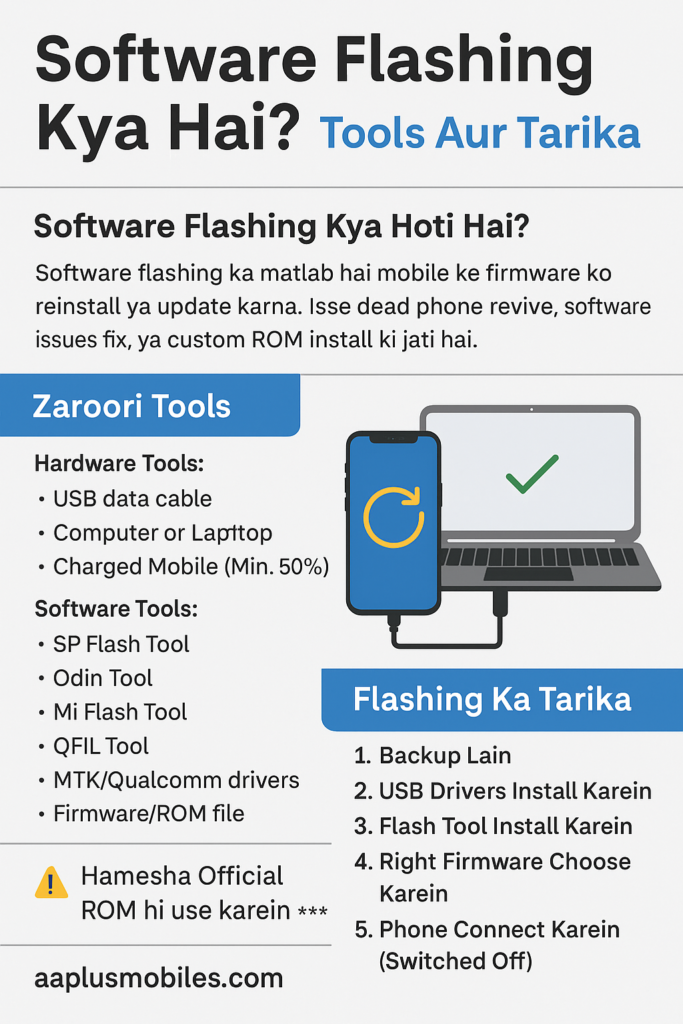
πŸ” Software Flashing Kya Hoti Hai?

Software flashing ka matlab hai mobile ke operating system (firmware) ko dobara install karna ya update karna. Jab phone hang ho jaye, boot loop mein chala jaye, pattern lock na khule, ya virus aa jaye – to flashing hi ultimate solution hota hai! πŸ’‘

Zyada tar flashing 2 wajah se ki jati hai:

  1. Stock ROM flashing – original software ko dobara install karna
  2. Custom ROM flashing – naye features ke liye customized software install karna

πŸ› οΈ Software Flashing Ke Liye Zaroori Tools

Flashing ka kaam karne ke liye aapko kuch essential tools aur software chahiye honge:

βœ… Hardware Tools:

  • πŸ”Œ USB Data Cable (Original/Good Quality)
  • πŸ’» Computer or Laptop
  • πŸ”‹ Charged Mobile (Minimum 50%)

βœ… Software Tools (PC mein install hone chahiye):

  • SP Flash Tool (MTK phones ke liye)
  • Odin Tool (Samsung devices ke liye)
  • Mi Flash Tool (Xiaomi phones ke liye)
  • QFIL Tool (Qualcomm phones ke liye)
  • MTK/Qualcomm Drivers
  • Firmware/ROM file (jo aapke device model ke mutabiq ho)

πŸ‘¨β€πŸ”§ Software Flashing Karne Ka Tarika (Step-by-Step)

Yahan ek basic flashing process explain kiya gaya hai (SP Flash Tool ka example le kar):

πŸ”Ή Step 1: Backup Lain

Flashing se pehle data ka backup zaroor lein – warna sab kuch delete ho jayega.

πŸ”Ή Step 2: USB Drivers Install Karein

MTK ya Qualcomm device ke drivers apne computer mein install karein taki phone detect ho jaye.

πŸ”Ή Step 3: Flash Tool Install Karein

SP Flash Tool ko download karein aur extract kar ke open karein.

πŸ”Ή Step 4: Right Firmware Choose Karein

Apne phone ka exact model number dekh kar correct firmware choose karein. Agar galat firmware flash kiya to phone dead bhi ho sakta hai. ⚠️

πŸ”Ή Step 5: Scatter File Load Karein

Firmware folder se .scatter file ko load karein SP Flash Tool mein.

πŸ”Ή Step 6: Download Button Press Karein

Flashing shuru karne ke liye β€œDownload” button dabayein.

πŸ”Ή Step 7: Phone Connect Karein (Switched Off)

Phone ko switch off kar ke data cable se PC se connect karein. Kuch hi seconds mein flashing start ho jaye gi.

πŸ”Ή Step 8: Wait for Green Tick βœ…

Flashing complete hone ke baad green tick nazar aayega. Ab phone ko disconnect kar ke on karein.


πŸ’‘ Kab Flashing Karna Zaroori Hota Hai?

  • Phone stuck ho β€œboot logo” pe
  • Pattern ya password bhool gaye ho
  • Phone pe virus attack ho gaya ho
  • System apps crash ho rahi ho
  • Phone slow ya laggy ho gaya ho
  • Mobile dead ho jaye (but hardware ok ho)

⚠️ Safety Tips for Flashing + Gift

  • πŸ”‹ Phone ka 50% se zyada battery ho
  • πŸ”Œ Flashing ke dauraan data cable nikaalna nahi
  • βœ… Hamesha official ROM hi download karein
  • πŸ’Ύ Backup lena mat bhoolen
  • ❌ Galat model ka firmware use na karein
  • Gifr Ye Hai K aap ko har tarah ki free Files Mil Jay Gi is Website Gsmexpertmobiles sy

🧠 Summary

Flashing Ka Faaida Aur Future Scope
Software flashing har technician ke skill set ka essential part hai. Ye na sirf corrupted system files ko replace karta hai balkay dead phones ko bhi revive kar sakta hai. Flashing karte waqt safety precautions lena bohot zaroori hai, jaise ke correct firmware ka selection, backup lena, aur power loss se bachna.

Aaj kal kai mobile brands ka firmware freely available hai aur tools bhi affordable hote ja rahe hain – jese SP Flash Tool, Odin, Miracle Box, etc. Har mobile technician ko chahiye ke wo flashing tools ke sahi use, firmware compatibility, aur error handling mein expert ho jaye.

Agar aap ek student hain ya workshop chala rahe hain, to software flashing aap ke liye ek golden skill ho sakti hai jo na sirf aapko different banati hai, balkay aapke income sources bhi barhati hai.

Toh ready ho jaiye professional technician banne ke liye – flashing seekhiye, tools use karna sikhiye aur har software issue ka smart solution dijiye! πŸ’»βš™οΈπŸš€

Agar aap bhi flashing seekh kar expert banna chahte hain, to aaplusmobilaaplusmobiles.comes.com par naye courses check karna na bhoolen!